
For viewing of this documention, please open the ChangeMaker and open it via the Help in the Ribbon.
For viewing of this documention, please open the ChangeMaker and open it via the Help in the Ribbon.
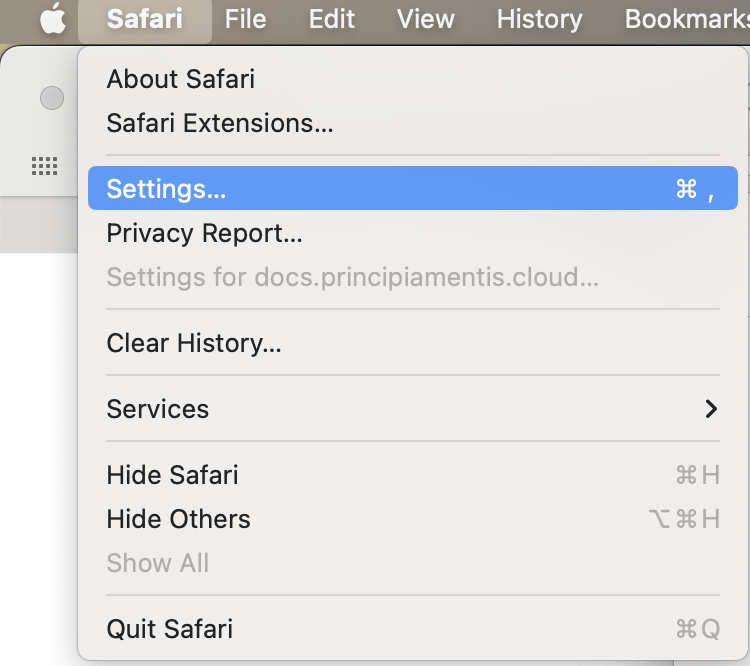
When opening the documentation in Safari, you will need to change a local setting due to the usage of cookies.
To begin, open "Safari" in the top menu bar, and then select "Settings..." from the drop-down menu.
In the Settings window, click on the "Privacy" tab located at the top.
Here you will need to uncheck the checkbox next to "Prevent cross-site tracking.".

Now you can close the "Settings" window and open the documentation again by clicking on the link via the help in the ChangeMaker.
When opening the documentation in Firefox, you will need to change a local setting due to the usage of cookies.
To begin, open about:config in a new tab in Firefox.
Then you can type "cookieBehavior" in the search. Here, you will need to change the network.cookie.cookieBehavior from 5 to 4.

You can do so by clicking the  icon, typing 4 and accepting the changes.
Now you can open the documentation again by clicking on the link via the help in the ChangeMaker.